To stress-test an AI workflow, run it on cases where you already know the right answer, including awkward and wrong inputs, before it touches real customers or candidates. Limit what it can do without a person’s approval, and make sure someone can pause it and see what it rejected or sent. An automation repeats its mistakes on every run, so a small error that nobody sees grows into a large one.
Why does one small mistake in an automation turn into a much more consequential one?
A demo runs on a tidy example, but real work arrives with typos, missing fields, different wording and exceptions. An automation repeats the mistake on every such case, at machine speed, and often nobody reads the output. A person’s wrong call affects one customer; a wrong rule affects everyone who meets it. The four cases below, one of them our own, fail in four different ways.
Case study 1: Our own blog workflow picked a keyword nobody chose
ClimbX uses an automated routine and a written style guide to prepare first drafts of these posts, which I then edit. In one recent draft, the routine picked its own focus keyword. It labeled it as the target. It mentioned the gap only in a notes list. The keyword sheet had no row for that topic, and nothing in the instructions said what to do then. I found it only when I asked which keyword the post was targeting.
The style guide was detailed, and it still had a gap. The fix is one written rule: if no keyword fits, say so and ask. I am still finding gaps like this one, which is why testing does not stop at launch.
Case study 2: A one-word mismatch rejected a qualified applicant in six minutes
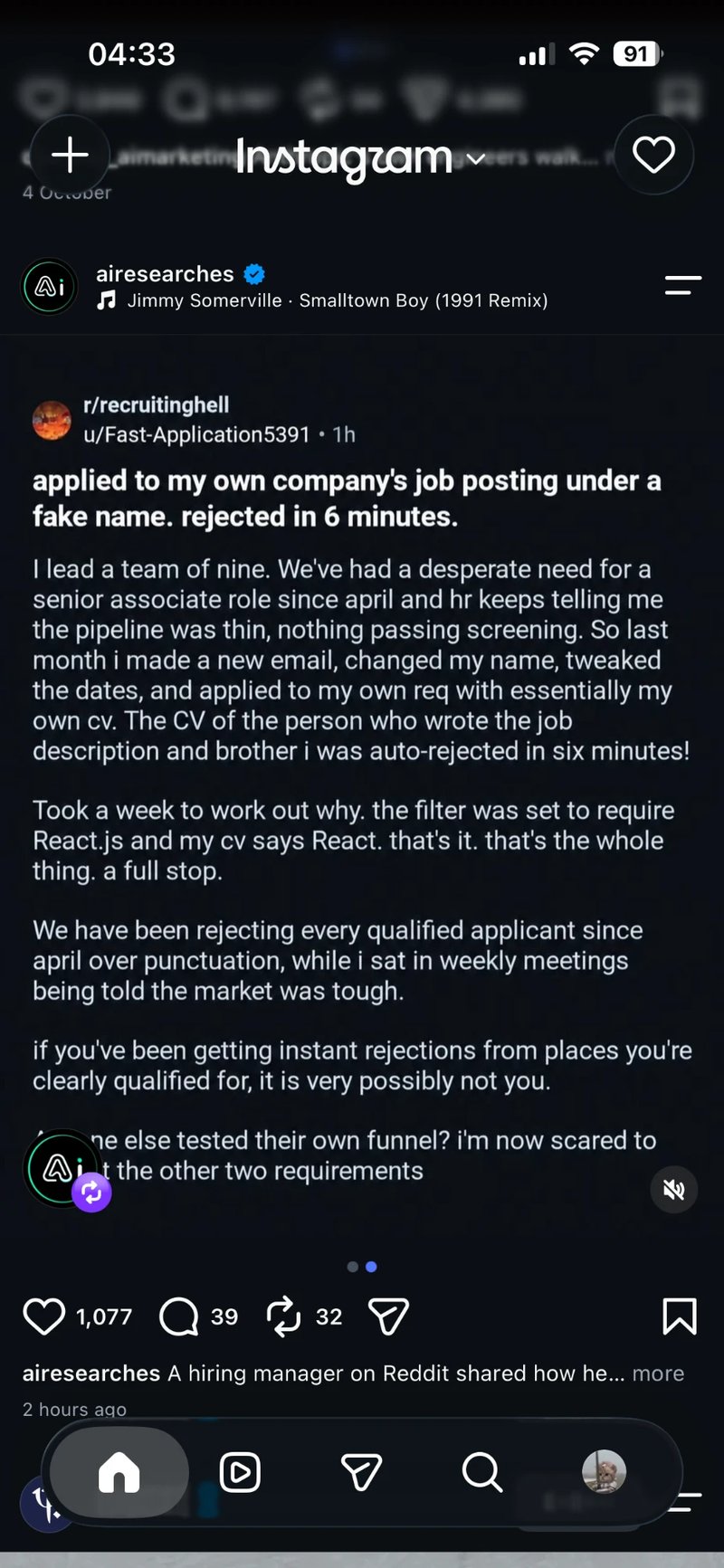
Screenshot of the post as shared on Instagram. We could not trace the original thread.
A post on Reddit’s r/recruitinghell, which I saw shared on Instagram, says a team leader applied to his own company’s senior associate opening under another name, with a lightly edited version of his own CV, and was rejected automatically in six minutes. He says it took a week to find the cause: the screening rule required “React.js” and his CV said “React”. The role had been open since April while HR reported a thin pipeline. I could not trace the original thread, so treat the details as unverified.
The filter was a keyword rule, not AI, but the same risk applies when you use AI for human resources tasks such as CV screening. A known-good CV sent through the live route, in the wording variations real people write, would have caught it in minutes.
Harvard Business School and Accenture’s “Hidden Workers” research, a survey of 2,275 executives in the US, UK and Germany, found that the majority of employers acknowledged their hiring systems rejected potentially productive applicants. Joseph Fuller summarises the findings in How to Tap the Talent Automated HR Platforms Miss.
Case study 3: A deployment mistake sent four million orders in 45 minutes
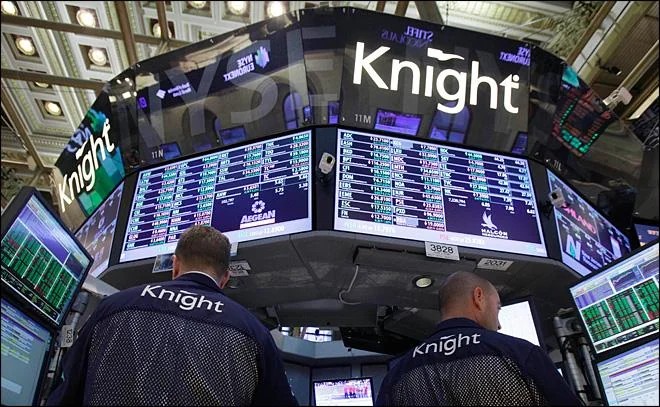
The US Securities and Exchange Commission’s 2013 action against Knight Capital says the trading firm incorrectly deployed new code in late July 2012. In the first 45 minutes after the market opened on 1 August, its router sent more than 4 million orders into the market. Knight eventually lost more than US$460 million and paid a US$12 million penalty. The details are in the SEC’s announcement.
This was automated trading software, not AI, at a firm far larger than an SME, so take the speed from it, not the details. The lesson for a small team is mine, not the SEC’s: limit what the workflow can do before anyone looks, and give a named person the power to pause it.
Case study 4: A chatbot told a customer something the policy did not say

In February 2024, a British Columbia tribunal ordered Air Canada to compensate a customer after its chatbot said he could claim a bereavement fare after travelling, while the airline’s own policy page said the fare did not apply after travel. The tribunal wrote that it “should be obvious to Air Canada that it is responsible for all the information on its website”. The ruling is Moffatt v. Air Canada, 2024 BCCRT 149.
We covered the case in how to map a workflow before you automate it. For testing, ask the awkward questions yourself and compare every answer with your written policy before a customer does.
How do you stress-test an AI workflow before it goes live?
Build a small set of cases with known answers, add awkward variations, run them with nothing sent, and fix and re-run before going live in a small way.
- Write down what a wrong result looks like, such as a wrongly rejected applicant, a wrong price or a wrong customer email, and which one costs most.
- Collect 10 to 20 real past cases where you know the right answer. Remove names and personal details first, and follow your organisation’s data policy and Malaysia’s Personal Data Protection Act 2010.
- Add awkward variations: the same thing in different wording (“React” and “React.js”, “Bahasa Malaysia” and “Malay”), blank fields, duplicates, the wrong format, a rude message, and a question your policy does not cover.
- Run the set with nothing sent or decided, and have a person compare each result with what they would have done.
- Fix the rule, then re-run the whole set, because a fix can break something that worked.
- Go live with one team or one small batch first.
The Personal Data Protection Department (JPDP) published a draft AI and personal data framework on 5 October 2026, open for comment until 23 October. It says an AI system that processes personal data should be tested and validated before deployment, and go live only once the organisation is reasonably satisfied that testing is complete (paragraphs 14.1 and 14.5). It is a draft that may change, and it covers AI that processes personal data, not every automation.
Which decisions should an AI automation never make on its own?
Anything that commits the company or turns a person away needs a person’s approval, because AI drafts and people decide. That includes prices and discounts, refunds, rejecting an applicant or customer, delivery promises, and anything sent under someone’s name. In AI customer service, a person should approve refunds, compensation and any answer about policy that the workflow has not been tested on. The approver should see the reason, not only a score.
How do you make sure you can pause an automation and see what it did?
Name one owner, give that person a way to pause the workflow, and review what it rejected or sent every week. Malaysia’s Digital Minister, Gobind Singh Deo, told the MyMahir AI Roadshow in Petaling Jaya on 8 August 2026, as Malay Mail reported, that “there must also be layers to ensure that if anything goes wrong, we are still in a position to control it”.
The JPDP draft points the same way. It asks organisations to monitor AI systems throughout their operating life (paragraph 17.1), and says corrective steps can include restricting the relevant processing until a material issue is addressed (17.3). In practice, that is a pause switch and someone who knows when to use it.
How do you keep improving an AI automation after it goes live?
Treat every mistake a person catches as a missing instruction, then write the rule and add the case to your test set. A stress test is not a one-off, because the work, the policy and the tool keep changing.
- Each week, read a handful of the workflow’s rejections and replies against the written rules.
- When you find a mistake, note what went in, what came out and what should have happened.
- Find the gap. It is usually a situation the instructions never covered. In our keyword case, nobody had written down what to do when no row in the sheet fits.
- Write the rule, add the case to your test set, and re-run the whole set.
- Re-run it whenever the rules, the policy, the job description or the tool changes, and check that failure alerts reach a named person.
What improves when you stress-test before you launch
- Wording gaps are found by you, not by a candidate or customer.
- A mistake affects a small batch, not everyone.
- Someone owns each rule and can pause the workflow.
Frequently asked questions
What is stress-testing an AI automation?
Stress-testing means deliberately running an automation on the cases most likely to break it, such as unusual wording, blank fields and questions outside policy, and checking what it does when it fails. You do it before launch and after every change. The aim is to find the small errors that would otherwise repeat on every run.
How do I test an AI workflow before using it with customers?
Run 10 to 20 past cases with known answers through it, plus awkward variations, with nothing sent. Compare each result with what a person would have done, fix the rules and re-run the whole set. Then go live with one team or a small batch, using test data without personal details.
What are the limitations of AI in an automated workflow?
AI can misread wording it was not tested on, give answers your policy does not support, and repeat one error across every case before anyone notices. It also cannot be accountable for a decision. That is why a person should approve anything that commits the company or turns someone away, and review what the workflow rejects.
Do I need a developer to test an automation?
Not for the test itself. Collecting cases with known answers, comparing outputs and reading rejections takes knowledge of the work, not code. Agree before launch who can pause or change the workflow, because that person needs to be reachable when something goes wrong.
Want to practise this with a trainer and your own work? We also have a course on this topic:
AI for Business is a two-day, in-person AI course in Malaysia from ClimbX Academy, an HRDC/HRDF registered training provider in Kuala Lumpur. It is for non-technical professionals in any business function, and works as an AI course for beginners as well as for people already using AI at work. Participants learn to use generative AI for documents, reports, data analysis and customer communication, set safeguards for responsible use, and leave with an AI implementation roadmap for their organisation. The next session runs on 19–20 January 2027, 9am to 5pm, at ACCEA UOA, Wisma Centre KLCC, Kuala Lumpur, and it is HRDC/HRDF claimable, with an early-bird fee of RM 2,990 per participant. WhatsApp +60 184633304 or email hello@climbxacademy.com.
Sources
- US Securities and Exchange Commission, SEC Charges Knight Capital With Violations of Market Access Rule, 16 Oct 2013
- BC Civil Resolution Tribunal, Moffatt v. Air Canada, 2024 BCCRT 149, 14 Feb 2024
- Joseph B. Fuller, Harvard Business School Working Knowledge, 5 Nov 2021, How to Tap the Talent Automated HR Platforms Miss
- Jabatan Perlindungan Data Peribadi, Kertas Konsultasi Awam Bil. 1/2026 · PDF (paragraphs 14.1, 14.5, 17.1, 17.3)
- Malay Mail, 8 Aug 2026, Gobind urges fail-safe layers, says unchecked AI could jeopardise trust and national security